
One Brand, Five Stores, Five Different Realities: How a Multi-Location POS Keeps Retail Under Control
Opening another branch creates more than another checkout counter. Learn how a multi-location POS should control inventory, pricing, permissions, transfers, reporting, customers, and daily operations without turning every store into a separate business.
One Brand, Five Stores, Five Different Realities: How a Multi-Location POS Keeps Retail Under Control
Opening another branch creates more than another checkout counter. Learn how a multi-location POS should control inventory, pricing, permissions, transfers, reporting, customers, and daily operations without turning every store into a separate business.
The Second Store Changes the Business Model
The first shop can survive on memory. The owner knows which shelf is low, which cashier needs help, which supplier is late, and which customer asked for a special order. The second shop breaks that model. Information is now split across people, devices, rooms, and opening hours.
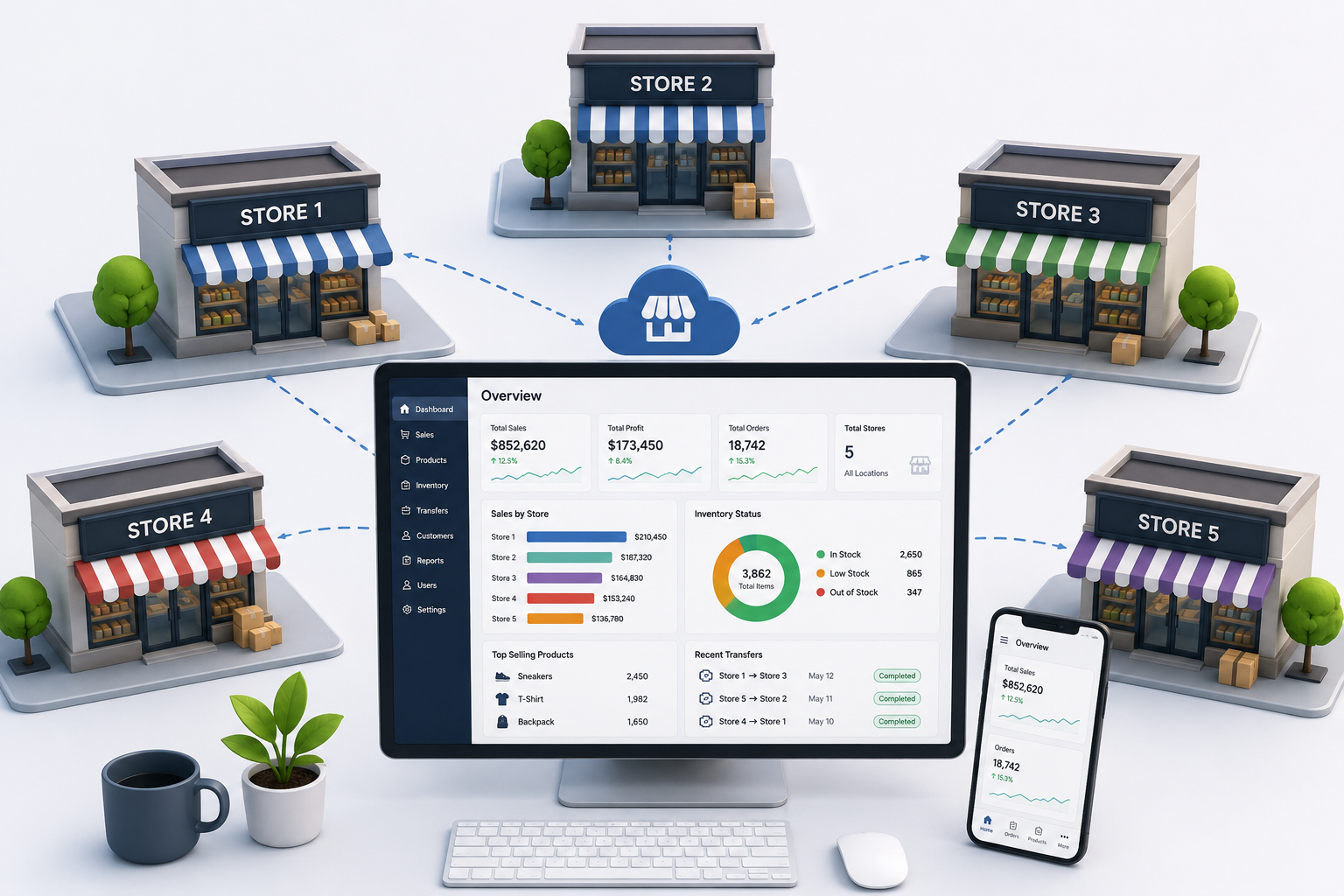
A multi-location POS is not simply the same checkout screen installed several times. It must define what belongs to the whole company and what belongs to a branch. Products may be shared, but stock is local. Prices may be central, but a branch may need an approved local markdown. Customers may shop everywhere, while cash drawers and shifts remain specific to one site.
In practice, The first shop can survive on memory. The owner knows which shelf is low, which cashier needs help, which supplier is late, and which customer asked for a special order. The second shop breaks that model. Information is now split across people, devices, rooms, and opening hours. The system should distinguish on-hand, available, reserved, in-transit, damaged, returned, and committed quantities by location. A sale, return, receipt, count, adjustment, online reservation, and transfer must affect the correct branch immediately. The rule should be documented centrally, assigned to a clear owner, and tested against real branch activity before it becomes company policy.
Inventory Must Belong to a Location
Inventory should never exist as one vague company number. Ten units in total can mean ten available in the customer’s branch, or nine in a distant warehouse and one damaged item nearby. Those situations create very different promises.
The system should distinguish on-hand, available, reserved, in-transit, damaged, returned, and committed quantities by location. A sale, return, receipt, count, adjustment, online reservation, and transfer must affect the correct branch immediately.
In practice, The system should distinguish on-hand, available, reserved, in-transit, damaged, returned, and committed quantities by location. A sale, return, receipt, count, adjustment, online reservation, and transfer must affect the correct branch immediately. A stock transfer is not a note saying that five units moved. It is a chain of custody: requested, approved, picked, dispatched, received, checked, and closed. The sending store and receiving store should not both count the same item as available. The rule should be documented centrally, assigned to a clear owner, and tested against real branch activity before it becomes company policy.
Central Control Should Not Remove Local Flexibility
Centralized management is useful for product records, taxes, core prices, roles, reporting definitions, and company policies. Yet stores face different realities: local competition, footfall, weather, events, rent, customer preferences, and delivery schedules.
Good permissions allow headquarters to protect standards while giving managers controlled authority. A branch may request a markdown, approve a return within a limit, change staff assignments, or order emergency stock without gaining unrestricted access to company-wide settings.
In practice, A multi-location POS is not simply the same checkout screen installed several times. It must define what belongs to the whole company and what belongs to a branch. Products may be shared, but stock is local. Prices may be central, but a branch may need an approved local markdown. Customers may shop everywhere, while cash drawers and shifts remain specific to one site. Head office wants comparison, but raw rankings can mislead. A city-centre branch, a seasonal kiosk, a suburban supermarket, and a new store should not be judged from revenue alone. The rule should be documented centrally, assigned to a clear owner, and tested against real branch activity before it becomes company policy.
Transfers Need Ownership and Evidence
A stock transfer is not a note saying that five units moved. It is a chain of custody: requested, approved, picked, dispatched, received, checked, and closed. The sending store and receiving store should not both count the same item as available.
Every transfer needs product, quantity, origin, destination, dates, users, status, discrepancies, and a reason. Damaged or missing units must be recorded during receipt, not hidden through a later manual adjustment.
In practice, Centralized management is useful for product records, taxes, core prices, roles, reporting definitions, and company policies. Yet stores face different realities: local competition, footfall, weather, events, rent, customer preferences, and delivery schedules. Dashierly or any multi-location POS should help owners see the company as one business while allowing every branch to operate correctly. The goal is not to make every store identical. It is to create consistent controls, trustworthy data, and enough local freedom to serve customers. The rule should be documented centrally, assigned to a clear owner, and tested against real branch activity before it becomes company policy.
Reports Must Compare Without Hiding Context
Head office wants comparison, but raw rankings can mislead. A city-centre branch, a seasonal kiosk, a suburban supermarket, and a new store should not be judged from revenue alone.
Compare sales, gross margin, transactions, average basket, stock turn, return rate, discount rate, staff hours, stockouts, shrink, transfer frequency, and customer retention. Then add context such as floor space, trading hours, maturity, and local campaign activity.
In practice, Inventory should never exist as one vague company number. Ten units in total can mean ten available in the customer’s branch, or nine in a distant warehouse and one damaged item nearby. Those situations create very different promises. A multi-location POS is not simply the same checkout screen installed several times. It must define what belongs to the whole company and what belongs to a branch. Products may be shared, but stock is local. Prices may be central, but a branch may need an approved local markdown. Customers may shop everywhere, while cash drawers and shifts remain specific to one site. The rule should be documented centrally, assigned to a clear owner, and tested against real branch activity before it becomes company policy.
Build One Operating System for Every Branch
The strongest multi-store operation uses one product structure, one permission model, one transfer workflow, one reporting dictionary, and one close-of-day discipline. Branches should not invent separate spreadsheets because the central system is too slow or too rigid.
Dashierly or any multi-location POS should help owners see the company as one business while allowing every branch to operate correctly. The goal is not to make every store identical. It is to create consistent controls, trustworthy data, and enough local freedom to serve customers.
Keep reading

You Ordered 100 Units, but Only 92 Arrived: How POS Purchase Orders Prevent Supplier and Receiving Errors
Purchase orders should connect planned buying with what physically arrives. Learn how a modern POS handles approvals, partial deliveries, damaged goods, substitutions, cost changes, backorders, supplier claims, and inventory updates without hiding discrepancies.
Read article
The Drawer Is Short at Closing—What Happened? How POS Shift Reconciliation Finds Cash Errors Before They Repeat
Cash shortages and overages are rarely solved by simply blaming the cashier. A reliable POS should connect opening floats, cash sales, refunds, payouts, drops, tips, drawer access, shift handovers, and closing counts. Learn how to reconcile every shift and turn differences into process improvements.
Read article
The Gift Card Was Sold Months Ago—Why Is It Still Money You Owe? How POS Systems Manage Stored Value
Gift cards and store credit bring cash in early, but they also create balances, redemption obligations, fraud risks, expiry questions, split payments, refunds, and accounting work. Learn how a modern POS should manage stored value from issue to final redemption.
Read article