
Practical Guide to Choosing a POS and Store Management System: Criteria That Help You Avoid Regret After Implementation
Choose the right POS and store management system with confidence. This practical guide covers the key criteria to compare before you buy, from inventory control and reporting to integrations, scalability, ease of use, and after-sales support, so you can avoid costly mistakes after implementation.
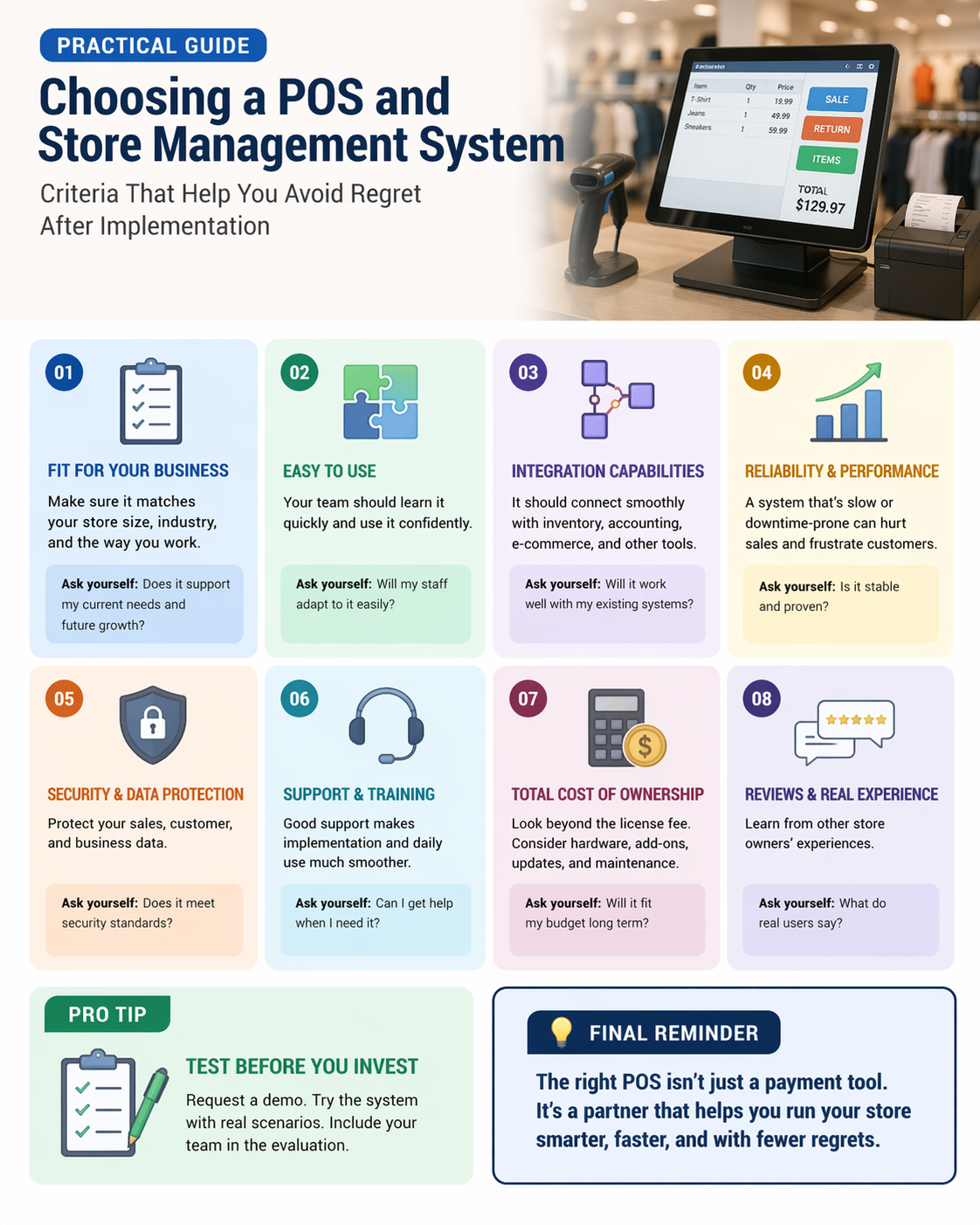
Practical Guide to Choosing a POS and Store Management System: Criteria That Help You Avoid Regret After Implementation
Choosing a point of sale and store management system is no longer a small technical decision. It is a business decision that affects sales speed, inventory accuracy, staff productivity, customer experience, reporting quality, and future growth. Many retailers make the mistake of focusing only on price or on flashy features during a demo, then discover after installation that the system is slow, hard to use, limited in reporting, or expensive to expand.
That is exactly why a practical and structured evaluation process matters.
In this guide, you will learn how to choose the right POS system and retail management software for your business, what criteria actually matter before purchase, and which warning signs can save you from expensive regret later. Whether you run a grocery store, fashion shop, pharmacy, electronics store, mini market, restaurant retail corner, or multi-branch retail business, these criteria will help you make a smarter decision.
Why Choosing the Right POS System Matters
A modern POS system does much more than process payments. It acts as the operational core of the store. It connects daily sales, stock movement, pricing, promotions, staff activity, customer data, purchasing, and business analytics in one place.
When the system is right, it helps you:
• Speed up checkout
• Reduce billing and inventory errors
• Track fast-moving and slow-moving items
• Manage promotions with better control
• Monitor branch performance
• Improve customer service
• Make better decisions based on real data
• Scale your retail business with less chaos
When the system is wrong, the opposite happens. Staff become frustrated, managers rely on manual fixes, inventory becomes unreliable, and business owners end up paying more to correct mistakes than they would have spent choosing properly from the start.
Start With Your Store’s Real Needs, Not the Sales Pitch
Before comparing software vendors, define what your business actually needs. This sounds obvious, but many companies skip it. They ask what the system can do before asking what they truly need it to solve.
Start by listing your operational reality:
• How many products do you sell
• Do you manage variants such as size, color, or packaging
• Do you need barcode support
• Do you have one branch or multiple locations
• Do you need warehouse and supplier management
• Do you sell online as well as in-store
• Do you need customer loyalty features
• Do you need staff permissions and shift tracking
• Do you need Arabic and English support
• Do you need tax, invoice, or compliance features specific to your market
A POS system for a small boutique is not the same as a POS system for a supermarket, pharmacy, or chain store. The best POS software is not the one with the longest feature list. It is the one that matches your business model without forcing you into daily workarounds.
Look for Ease of Use First
One of the biggest reasons store owners regret a POS installation is usability. A system may appear advanced during the demo, but if cashiers, supervisors, and store managers struggle to use it under real store pressure, efficiency drops immediately.
A good retail POS system should be easy to learn and fast to operate. Screens should be clear. Common actions should require as few steps as possible. Searching for products, applying discounts, processing returns, opening shifts, and closing sales should feel smooth.
Ask yourself these questions:
• Can a new cashier learn the basics quickly
• Are the screens organized logically
• Is checkout fast during peak hours
• Can employees avoid mistakes easily
• Does the system reduce training time
Complexity often looks impressive during presentations, but simplicity wins in real retail operations.
Make Inventory Management a Top Priority
Inventory is where many businesses lose money quietly. If the system cannot track stock accurately, everything else becomes harder. This is why inventory management should be one of the top decision factors when choosing retail management software.
Your POS and store management system should help you manage:
• Real-time stock levels
• Stock transfers between branches
• Warehouse quantities
• Product variants
• Reorder alerts
• Damaged and expired items
• Purchase orders
• Supplier records
• Stocktaking and cycle counts
• Inventory valuation
If your business deals with expiry dates, serial numbers, batches, or multiple units of measure, these features should not be optional add-ons. They should be part of the core workflow.
A system that handles sales well but fails in stock control will create daily friction and expensive inaccuracies.
Reporting and Analytics Should Support Decisions, Not Just Display Numbers
Many business owners realize too late that their new POS system offers weak reports. They can see total sales, but not the insights they need to run the business strategically.
A strong POS software solution should provide useful retail analytics such as:
• Sales by product, category, brand, and branch
• Profit margin reports
• Best-selling and slow-moving items
• Hourly and daily sales trends
• Cashier performance
• Discount analysis
• Return and refund reports
• Customer purchase behavior
• Inventory turnover
• Purchase and supplier analysis
Reports should be easy to filter, export, and understand. If you need to ask the vendor every time you want a new report, that is a warning sign. Good reporting turns raw store data into actionable decisions.
Check Integration Capabilities Before You Commit
Retail businesses rarely operate with one system only. Your POS may need to connect with accounting software, eCommerce platforms, payment terminals, barcode scanners, receipt printers, ERP systems, loyalty tools, SMS tools, or tax and e-invoicing platforms.
This makes integrations critical.
Before buying, ask what the system integrates with today, not what the vendor says they may build in the future. Confirm whether integrations are native, third-party, limited, or paid separately.
A scalable POS system should ideally support integration with:
• Accounting systems
• Online store platforms
• Payment gateways
• CRM tools
• Delivery systems
• Loyalty and rewards programs
• ERP or warehouse systems
• Electronic invoicing tools
Integration problems often appear after implementation, and that is when regret begins. A disconnected system creates duplicate work, manual entry, and higher error rates.
Scalability Is Essential for Long-Term Growth
Choosing a system only for your current store size can become a costly mistake. A POS solution should fit your business today, but it should also support your business tomorrow.
Think ahead. You may add new branches, launch an eCommerce channel, hire more staff, expand product categories, or build a central warehouse. If your system cannot grow with you, replacing it later will be far more expensive than choosing better now.
Look for signs of scalability such as:
• Multi-branch support
• Centralized product and pricing control
• Cloud access
• User role expansion
• Flexible permissions
• Advanced reporting by branch
• Larger inventory capacity
• Support for future integrations
• Mobile or remote access for management
A scalable retail management system protects your investment and reduces the risk of a disruptive migration later.
Cloud POS vs On-Premise POS: Choose Based on Operations, Not Hype
Many retailers ask whether cloud POS or on-premise POS is better. The answer depends on your operational priorities.
A cloud POS system often offers easier remote access, faster updates, centralized branch control, and lower upfront infrastructure requirements. It can be a strong option for growing businesses and multi-location retailers.
An on-premise POS system may appeal to businesses that want more local control, specific security preferences, or operational continuity in environments with unstable internet, depending on how the system is designed.
Instead of choosing based on trends, compare practical issues:
• Internet dependency
• Backup methods
• Data access
• Update process
• Branch management
• Total cost of ownership
• System speed
• Disaster recovery options
The best decision is the one that fits your business continuity needs, technical environment, and management style.
After-Sales Support Is More Important Than Most Buyers Realize
A POS system is not a one-time purchase. It is an ongoing operational dependency. That means technical support, training, maintenance, updates, and issue resolution are part of the buying decision.
Many buyers focus heavily on features and price, then discover later that support is slow, unavailable during peak hours, or unable to solve real operational problems.
Before signing any contract, ask:
• What are support hours
• Is support available on weekends and holidays
• Is there phone, chat, or on-site support
• How long does issue resolution usually take
• Are software updates included
• Is training included
• Is there an extra cost for branch visits
• Who handles implementation and onboarding
Strong after-sales support reduces downtime, protects revenue, and makes the system far more valuable over time.
Ask for a Real Demo Based on Your Workflow
A generic demo is not enough. Vendors often show ideal scenarios in a polished environment. That is useful, but it does not tell you how the system will perform in your real store.
Ask for a workflow-based demo using your actual retail scenarios. For example:
• A cashier selling multiple products with discounts
• A refund with a partial return
• Receiving a purchase order into stock
• Transferring inventory between branches
• Checking low-stock alerts
• Generating a best-selling items report
• Applying role-based permissions
• Handling a product with variants
• Managing end-of-day closing
This exposes weaknesses early. If the workflow feels slow, confusing, or dependent on manual steps, you are seeing the future of your daily operations.
Review Hardware Compatibility and Performance
The software is only part of the POS environment. You also need to consider the hardware ecosystem. A good POS system should work reliably with the devices your store uses or plans to use.
This may include:
• Barcode scanners
• Receipt printers
• Cash drawers
• Touchscreen terminals
• Handheld devices
• Label printers
• Customer displays
• Payment terminals
• Weighing scales
Ask the vendor to confirm compatibility in writing. Also ask whether performance stays stable during high transaction volume. A system that lags during busy hours can damage customer experience and reduce checkout efficiency.
Permissions and Security Should Not Be an Afterthought
Retail businesses handle sensitive data every day, from financial records to customer details and staff activity. A good store management system should include practical security controls, not just basic logins.
Look for features such as:
• Role-based access control
• Approval workflows for discounts and returns
• Audit logs
• Cashier activity tracking
• Secure backups
• User-specific permissions
• Branch-level access restrictions
• Data export controls
Security is not just about cyber risk. It is also about reducing internal misuse, pricing errors, and unauthorized actions that affect profits.
Understand the Full Cost, Not Just the Purchase Price
A low advertised price can be misleading. The real cost of a POS and store management system may include several hidden or ongoing expenses.
Always evaluate the total cost of ownership, including:
• Software license or subscription
• Implementation fees
• Data migration
• Training
• Hardware costs
• Support fees
• Update fees
• Additional branch fees
• Integration fees
• Customization fees
• Backup or hosting fees
The cheapest POS system is not always the most affordable in practice. A slightly more expensive solution with better support, stronger features, and fewer hidden costs may offer much better long-term value.
Read Customer Experience Carefully
Vendor promises are one thing. User experience is another. Before making a final choice, review testimonials, case studies, and customer feedback. Try to speak to businesses similar to yours if possible.
Pay attention to patterns such as:
• Repeated complaints about support
• Frequent issues after updates
• Limited reporting flexibility
• Poor branch synchronization
• Hidden costs after purchase
• Implementation delays
• Weak training quality
One complaint alone may not mean much. Repeated complaints around the same issue usually mean something real.
Watch for These Red Flags Before Buying
Some warning signs appear before the contract is signed. Ignoring them can lead to regret after installation.
Be careful if the vendor:
• Avoids giving clear pricing details
• Refuses a real workflow demo
• Gives vague answers about support
• Relies too much on future promises
• Cannot explain reporting clearly
• Offers weak training plans
• Avoids discussing limitations
• Cannot provide relevant client references
• Pushes urgency without discovery
A trustworthy vendor is usually transparent about both strengths and limitations. That honesty is often a sign of quality.
The Best POS System Is the One That Fits Operations, Growth, and Control
There is no universal best POS system for every retail business. The right choice depends on your daily workflow, product complexity, team structure, branch plans, reporting needs, and support expectations.
That is why smart buyers compare solutions using practical business criteria, not only marketing language. They focus on usability, inventory control, reporting depth, integrations, scalability, security, support, and total cost. These are the factors that determine whether a system becomes a growth tool or a long-term frustration.
Final Thoughts
Choosing a POS and store management system should never be rushed. The cost of choosing wrong is not just financial. It also appears in wasted time, employee frustration, poor visibility, weak customer experience, and difficult future expansion.
If you want to avoid regret after implementation, evaluate the system the way it will actually be used in your store. Focus on everyday operations, long-term flexibility, and real support quality. A smart POS decision today can improve control, profitability, and growth for years to come.
In retail, technology should reduce complexity, not create it. Choose the system that gives you clarity, speed, and confidence from day one.
SEO Keywords Included Naturally in This Article
POS system, store management system, retail management software, POS software, best POS system, choose a POS system, cloud POS, on-premise POS, inventory management system, retail POS system, point of sale software, multi-branch POS, retail analytics, store inventory control, scalable POS solution, retail business software, POS implementation, POS support, store operations, checkout system